
Set Your Duplicate Rules
1
Open Hiring rules
Go to Account > Organization > Hiring rules and find Block duplicate job applications.
2
Pick a rule for each cell
The grid has a row for Email and for Phone, and a column for Same Job Opening and Across All Job Openings. Choose an option in each cell.
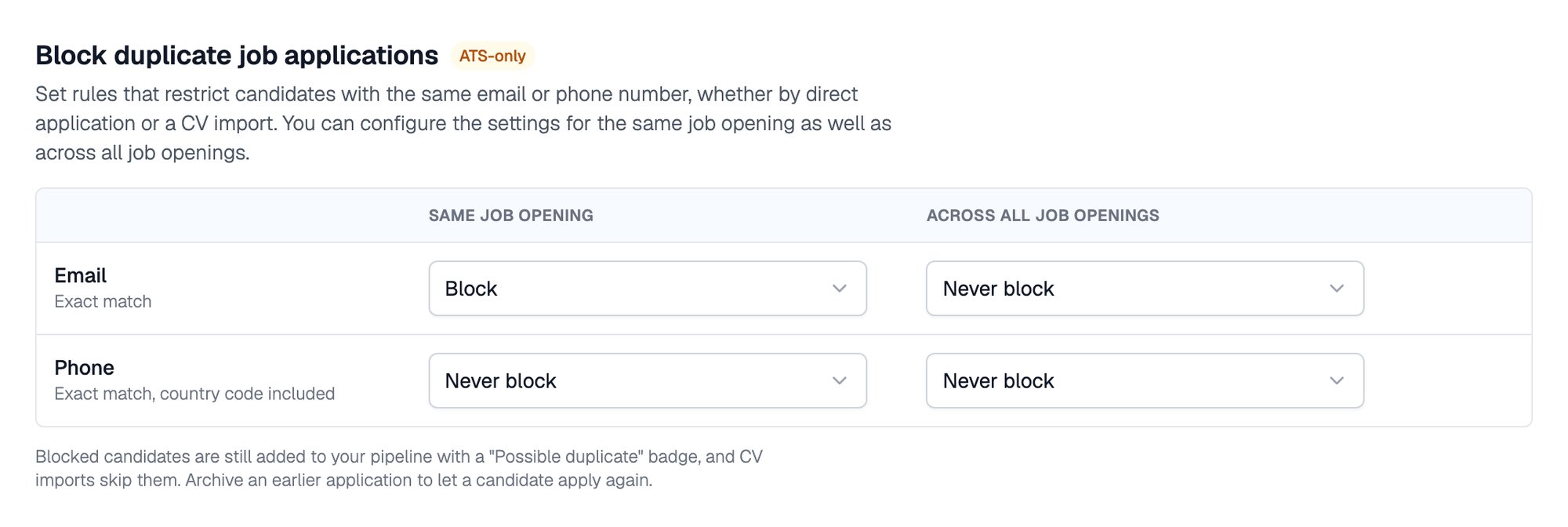
The duplicate application rules for email and phone
By default, the same email cannot be used twice on one job opening, and every other cell is set to Never block. Reset all to default brings these back.
Email matches are exact. Phone matches are exact and include the country code. “Same Job Opening” covers every job post under that opening.
What Happens to a Duplicate
For CV imports, a same-opening phone rule also skips the CV.
Hover over the Possible duplicate badge in the applications dashboard to see whether the email or phone matched, and whether the earlier application is on this opening or another one.
Related Resources
- Bulk CV Import - See which CVs were skipped as duplicates
- Candidates and CVs - Find flagged applications in the dashboard
- Application Form - Choose what candidates fill in when they apply
- Organization Settings - Other organization-wide settings