
Available Test Types
Add these from the Tests tab when creating an assessment. An assessment can contain any number of tests, and you can combine types freely.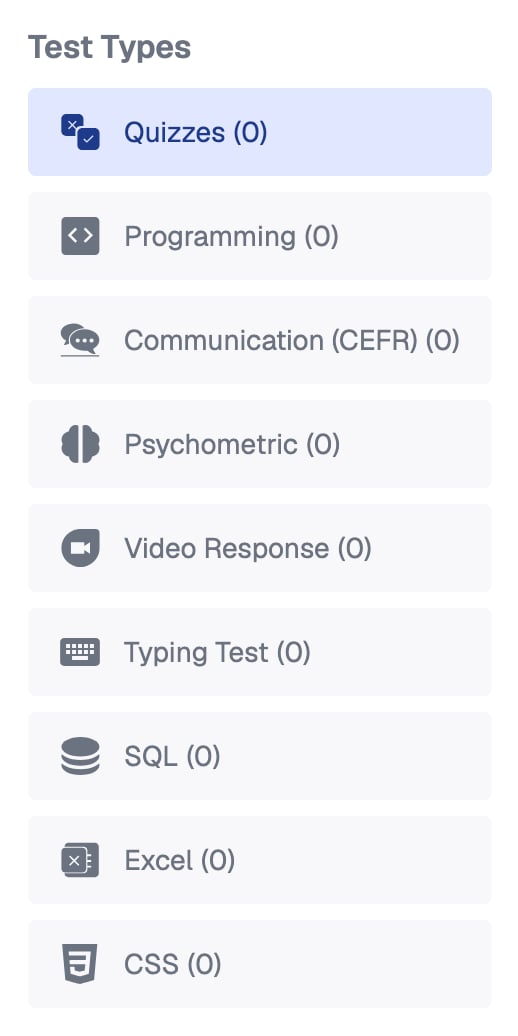
The nine test types in the Tests tab, with how many of each the assessment has
Desktop-only test types show a Desktop Only badge to candidates, so they know in advance to use a laptop or desktop computer.
Equip Content vs My Content
Every test type offers two sources of questions: Equip Content, the pre-built question library, and My Content, custom tests you author yourself. You can mix both within one assessment. See Equip Content vs Custom Content for a comparison. Custom quizzes can also show every question on one page instead of one by one. See Quiz Display Modes.How Each Test Type Is Graded
Most test types are scored automatically the moment a candidate submits. A few need a human reviewer, and two never count toward the overall score.
Psychometric results appear as a personality graph instead of points. The Typing Test reports speed and accuracy, with its weightage fixed at 0.
In a custom quiz, question types such as short-text answers, single-line inputs, and voice inputs are graded manually. A submission’s overall score stays marked as ungraded until you grade every pending test. See Grading Tests.
Choosing the Right Mix
When you create an assessment, you can also enter the role and years of experience, and Equip suggests tests and skills for you.
Every test type has a demo you can try yourself. See Demo Tests.
Related Resources
- Create an Assessment - Add test types and build your first assessment
- Equip Content vs Custom Content - What you can and cannot change in each
- Question Limits per Test Type - How many questions each test type holds
- Grading Tests - How auto-grading and manual grading work