
Score Benchmarks
Equip’s content team designs questions around a percentage as percentile rule of thumb. If you create an assessment for a Digital Marketer with 0 to 2 years of experience and a candidate scores 70%, you can interpret that as: this candidate is better than about 70% of practicing digital marketers with 0 to 2 years of experience. The same logic applies at any point on the scale.If your assessment mixes difficulty levels, for example 4 Medium skills and 2 Hard skills, the percentile reading becomes a weighted average across those experience levels. See Question Difficulty Levels for how difficulty maps to experience.
Context Matters
Equip selects questions based only on the skills and difficulty levels you choose. It knows nothing about your company, your hiring bar, or how selective the role needs to be. Before you anchor on a number, consider three questions:Using Cutoffs
Recruitment is often a relative game: you are looking for the best people in the pool you actually have. Instead of fixing a cutoff in advance, let the pool set it:1
Sort by Overall Score
Once most candidates have completed the assessment, open the results and sort by Overall Score.
2
Shortlist the top N
If you need 5 candidates from a pool of 100, take the top 5. You can also apply score filters and update candidate statuses, such as Shortlisted or Rejected, in bulk.
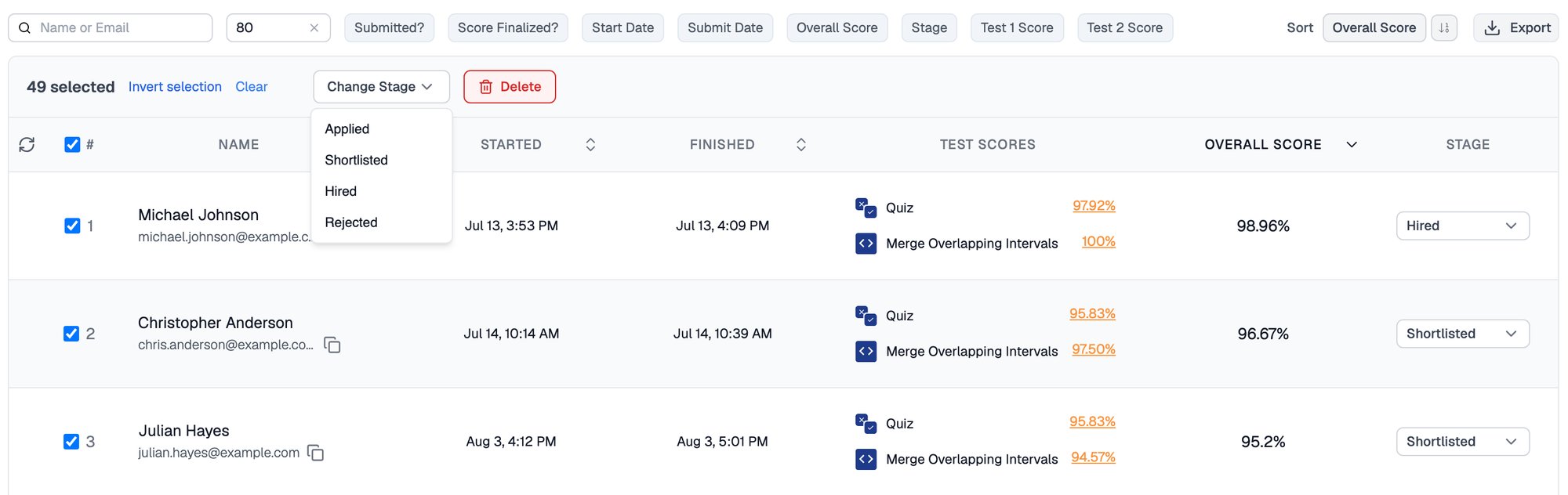
Set a cut-off, select the candidates above it, and change their stage together
Related Resources
- Test Scores and Overall Score - How per-test scores and weightages combine into the Overall Score
- Question Difficulty Levels - How Medium, Hard, and Expert map to years of experience
- CEFR Scores - Interpreting English Communication results on the A1 to C2 scale
- Psychometric Scores - Why personality tests carry no points or weightage