
Where Parsing Happens
For a candidate applying through your job post link, the flow looks like this:
1
Upload a resume
The candidate starts the application and uploads their resume.
2
Wait for parsing
Parsing typically takes 30 to 45 seconds.
3
Review and submit
The candidate corrects anything the parser got wrong, completes any remaining fields, and submits.
Candidates added through Bulk CV Import are marked as email not verified and do not receive stage-change emails until their email ID is verified.
Extracted Fields
The extracted values appear on the Candidate Profile. They also power dashboard filters, Candidate Search, Talent Rediscovery, and the Job Fit Score.
Normalization
After extraction, Equip normalizes each value against its canonical databases of skills, roles, cities, companies, and educational institutions. This means “JS”, “Javascript”, and “JavaScript” resolve to one skill, so filters, search, and fit scoring treat them identically.Institution matching is country-aware, which avoids mixing up similarly named institutions in different regions.
Parsing Failures
See Bulk CV Import for the failure reasons and how to fix them.
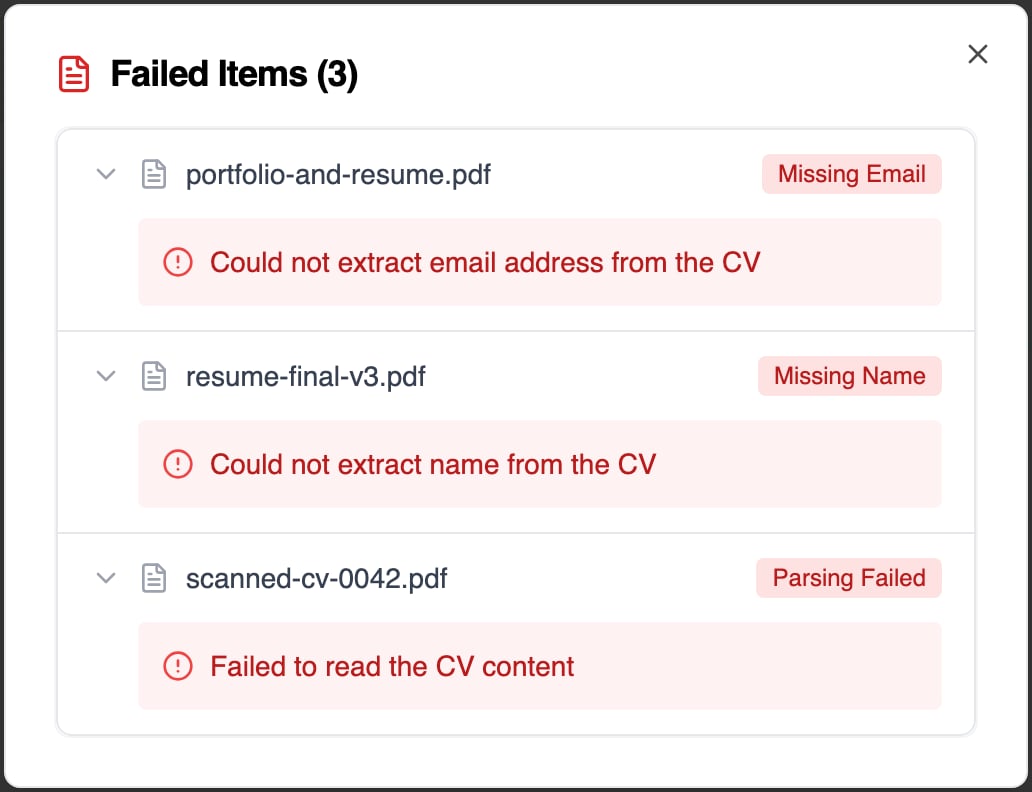
Failed files in a bulk import, each with the reason it could not become an application
Related Resources
- Bulk CV Import - Upload up to 100 resumes at once and track per-file results
- Job Fit Score - How parsed profiles are ranked against your criteria
- Candidate Profile - Where extracted fields appear and how to edit them
- Application Form - Configure which fields candidates fill out when applying