
The 11 Stage Types
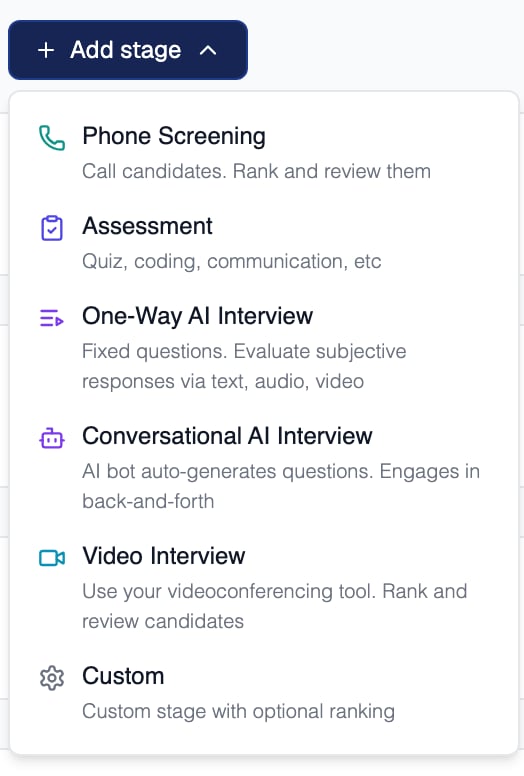
The stage types you can add to a pipeline
The Configurable stages are yours to add, rename, and reorder by dragging. Offered and the terminal stages are managed by Equip.
Terminal stages (Hired, Rejected, Withdrawn) mark the end of a candidate’s journey. Candidates in them are excluded from the dashboard’s default Relevant filter.
When you add an Assessment, One-Way AI Interview, or Conversational AI Interview stage, Equip automatically creates the underlying assessment or interview for you.
Per-Stage Configuration

A stage has a name candidates see, an internal name, and its own email templates
Attached email templates pre-fill the invitation or rejection dialog when you move a candidate, and you confirm each email before it goes out. To have a stage act on its own, add Stage Automation rules to it.
Status vs Stage
Alongside its pipeline stage, every application also carries a candidate status. The two are independent.
For example, a candidate can sit in the Assessment stage with a status of Shortlisted.
Archiving Stages
You can delete a stage from the pipeline builder. Archived stages keep their candidates and history intact, and you can restore them when you need one back.Terminal stages (Hired, Rejected, Withdrawn) cannot be deleted.
Related Resources
- Candidates and CVs - Work the pipeline day to day in Table and Kanban views
- Changing Stages - What happens when you move candidates between stages
- Scorecards - Build rating templates for screening and interview stages
- Email Templates - Set up the invitation and rejection emails stages use