
https://equip.co/api/v3/mcp/ through its config file. The server is read-only, so Codex can look things up but never change them.
Add the Server
You need your organization’s API key in your shell asEQUIP_MCP first; see Connect Your AI Assistant to Equip.
1
Edit config.toml
Add this to
~/.codex/config.toml:bearer_token_env_var names the variable, so Codex reads the key from your environment and the key itself never sits in the file.2
Check the connection
Run
codex mcp list in a terminal, or start Codex and ask “what tools do you have from equip?”.3
Ask a question
Try: “Which of my job openings have the most candidates waiting in screening?”
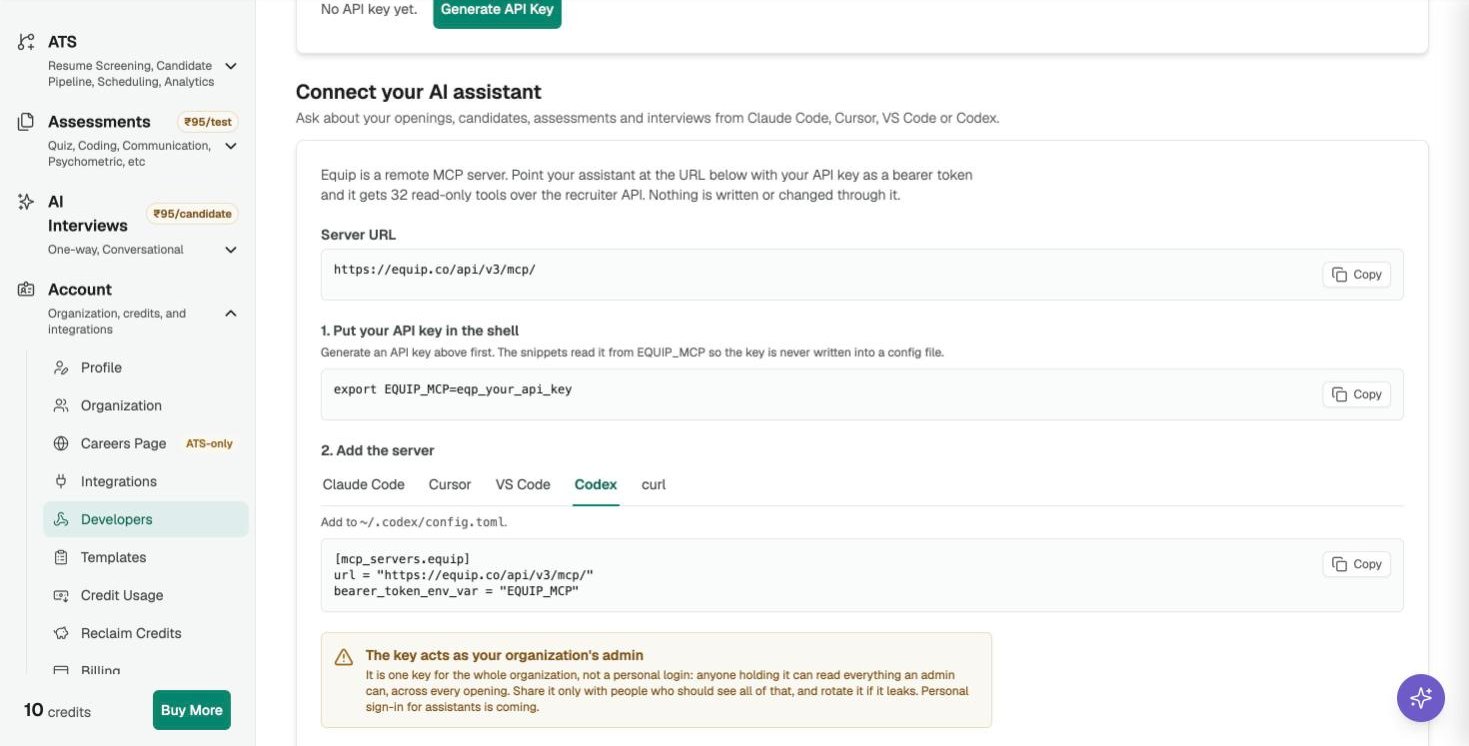
The Codex snippet on the Developers page
Troubleshooting
Troubleshooting
- 401 Invalid API key: the key was mistyped or rotated, or
EQUIP_MCPis not exported in the shell you started Codex from. Runecho $EQUIP_MCPthere. - 403 “isn’t included in your plan”: your plan does not include the MCP server. See Compare Plans, or contact support to have it switched on for your organization.
- The server shows but has no tools: quit and restart Codex after editing the file.
Related Resources
- Connect Your AI Assistant to Equip - Getting the key, what the tools can read, other clients
- API Integrations - The REST API behind the same key