> ## Documentation Index
> Fetch the complete documentation index at: https://help.equip.co/llms.txt
> Use this file to discover all available pages before exploring further.
# Roles and Permissions
> What the Owner, Admins and Recruiters can each do, and how to change someone's role.
Every member of your organization has one **organization role**: Owner, Admin or Recruiter, and each uses one seat. [Departments](/departments) add a Department admin role, while the [hiring team](/job-requisitions) and [interview panel](/interview-panels) members work with you without a seat or a role.
## Change a Member's Role
Go to [**Account > Organization > People**](https://equip.co/recruiter/account/organization/people/).
Click the **three dots** on the member's row and choose **Make Admin**, **Remove Admin Rights** or, if you are the Owner, **Transfer Ownership**.
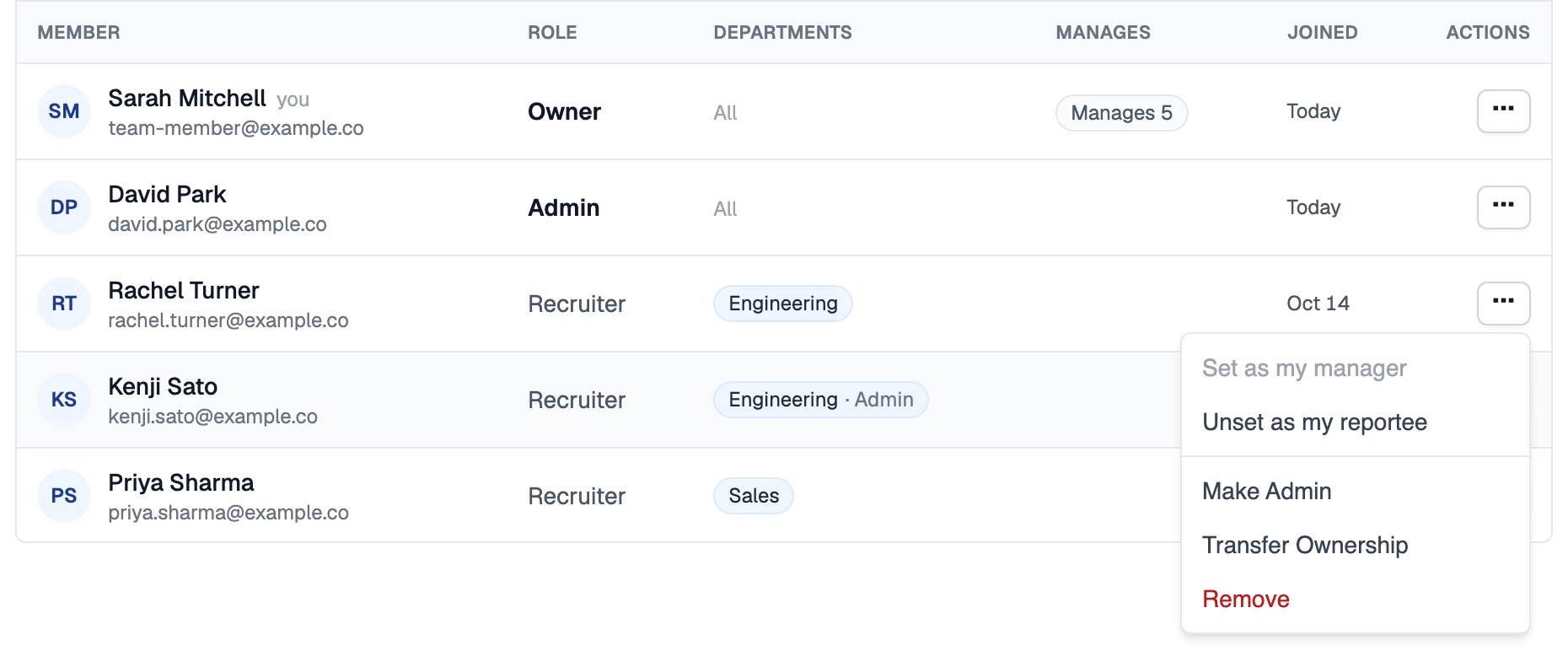 When the Owner transfers ownership, they become an Admin. An organization always has exactly one Owner.
## What Each Role Can Do
| Action | Recruiter | Admin | Owner |
| - | - | - | - |
| Create job openings, assessments and AI interviews, invite candidates, view results | ✓ | ✓ | ✓ |
| Edit company details and [hiring rules](/duplicate-applications) | ✓ | ✓ | ✓ |
| Invite and remove members, make or remove Admins | | ✓ | ✓ |
| Turn auto-join on or off | | ✓ | ✓ |
| Create departments and manage their members | | ✓ | ✓ |
| Manage [Integrations](https://equip.co/recruiter/account/integrations/) and the [Developers](https://equip.co/recruiter/account/developers/) page | | ✓ | ✓ |
| See every department's job openings and candidates | | ✓ | ✓ |
| Change the plan, buy or remove seats, edit the GSTIN | | | ✓ |
| Transfer ownership | | | ✓ |
No one can remove the Owner, and no one can remove themselves. To have the current Owner leave, they first transfer ownership to someone else.
## Reporting Lines
Reporting lines are separate from roles. Any member can record who manages whom from the same actions menu on the People tab:
| Option | What it records |
| - | - |
| **Set as my manager** | That member manages you |
| **Set as my reportee** | That member reports to you |
## Related Resources
* [Members and Seats](/manage-team-members) - Invite, remove and buy seats for members
* [Departments](/departments) - Department admins and who sees what
* [Organization Settings](/organization-settings) - Company details, auto-join and defaults
* [Compare Plans](/compare-plans) - Seat limits on each plan
This documentation is built and hosted on [Mintlify](https://mintlify.com), a developer documentation platform.
When the Owner transfers ownership, they become an Admin. An organization always has exactly one Owner.
## What Each Role Can Do
| Action | Recruiter | Admin | Owner |
| - | - | - | - |
| Create job openings, assessments and AI interviews, invite candidates, view results | ✓ | ✓ | ✓ |
| Edit company details and [hiring rules](/duplicate-applications) | ✓ | ✓ | ✓ |
| Invite and remove members, make or remove Admins | | ✓ | ✓ |
| Turn auto-join on or off | | ✓ | ✓ |
| Create departments and manage their members | | ✓ | ✓ |
| Manage [Integrations](https://equip.co/recruiter/account/integrations/) and the [Developers](https://equip.co/recruiter/account/developers/) page | | ✓ | ✓ |
| See every department's job openings and candidates | | ✓ | ✓ |
| Change the plan, buy or remove seats, edit the GSTIN | | | ✓ |
| Transfer ownership | | | ✓ |
No one can remove the Owner, and no one can remove themselves. To have the current Owner leave, they first transfer ownership to someone else.
## Reporting Lines
Reporting lines are separate from roles. Any member can record who manages whom from the same actions menu on the People tab:
| Option | What it records |
| - | - |
| **Set as my manager** | That member manages you |
| **Set as my reportee** | That member reports to you |
## Related Resources
* [Members and Seats](/manage-team-members) - Invite, remove and buy seats for members
* [Departments](/departments) - Department admins and who sees what
* [Organization Settings](/organization-settings) - Company details, auto-join and defaults
* [Compare Plans](/compare-plans) - Seat limits on each plan
This documentation is built and hosted on [Mintlify](https://mintlify.com), a developer documentation platform.